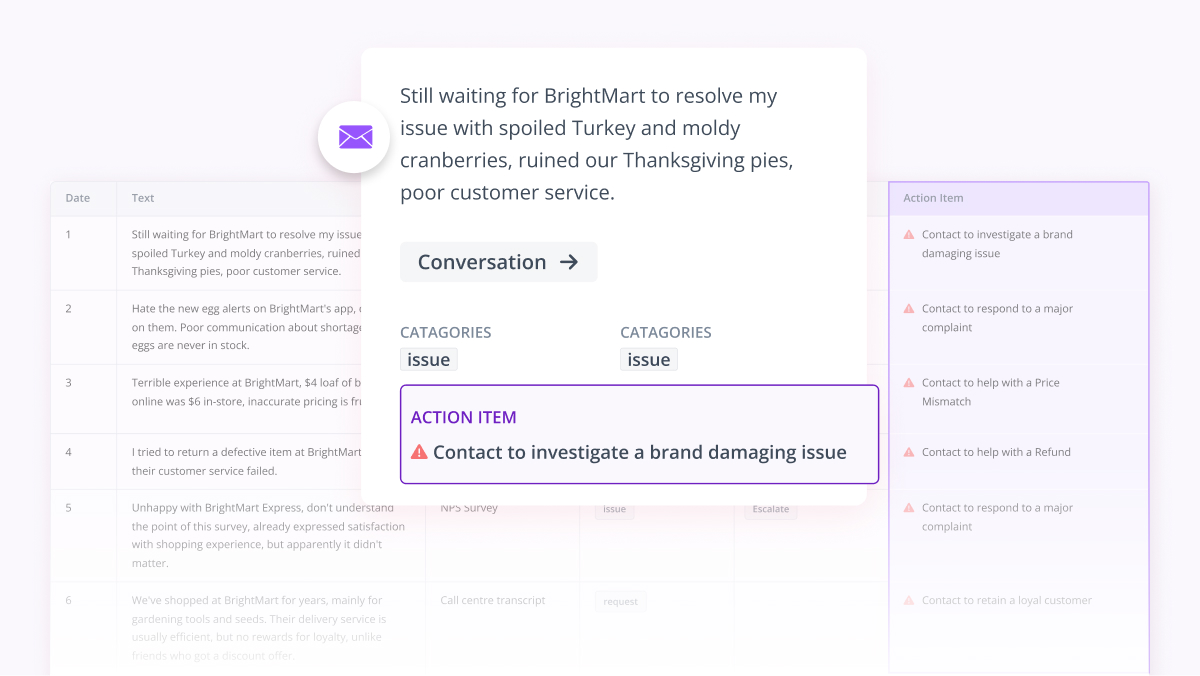
If you're already working inside Claude, ChatGPT, Gemini, or Microsoft 365 Copilot, you've almost certainly tried to ask them about your customer feedback. You paste in a few hundred open-ended comments and ask the bot to surface the core themes.
The output looks pretty convincing. But poke beneath the surface and it rarely matches how your team actually categorizes customer pain points. Worse, it leaves most of your data sitting on the cutting room floor.
The Thematic MCP Server closes that gap.
Think of it as a conversational bridge that allows the AI assistants you're already using to run deep, mathematically sound customer feedback analysis inside Thematic on your behalf, entirely through natural conversation.
You ask a question in the chat interface you already live in, and the assistant queries Thematic for the specific themes, sentiment scores, raw comments, or deep dives it needs to construct an answer.
The analytical heavy lifting happens under the hood inside Thematic, using the exact same data pipelines and custom-trained theme models your insights team relies on. The verified answer is then fed straight back into your chat window.
Instead of fighting with disjointed data silos or building custom pipelines, the connection brings the data engine to where your workflows already happen.
What "MCP" actually means
MCP stands for Model Context Protocol, an open standard built to connect AI applications to external data repositories and analytical tools. When Anthropic open-sourced the protocol, the industry described it as a new standard for connecting AI assistants to the systems where corporate data actually lives.
Think of it like a universal USB-C port for AI architecture.
Instead of engineering a fragile, bespoke integration for every single software tool in your stack, it provides one standardized way to plug an assistant into outside systems.
For CX and insights professionals, the distinction worth pausing on is the operational line between the language model and the AI agent: The language model simply generates text based on probability. On its own, it doesn't call APIs, it can't query databases, and it has no concept of your underlying customer data.
The AI agent is the orchestration layer inside the assistant. It evaluates your prompt, determines what external knowledge is needed, and decides which connected MCP servers to query, what parameters to pass, and how to weave those hard analytics into a coherent response.
This is the critical piece of the puzzle.
The Thematic MCP Server isn't a basic plugin that a language model blindly calls.
It's an infrastructure layer that an AI agent connects to securely via your corporate authentication. Once connected, the agent has access to a defined set of purpose-built Thematic tools, choosing the right instrument based on what you've actually asked.
A concrete example. You open Claude and ask, "What are the top themes in last quarter's NPS survey?" Claude's agent recognizes that Thematic has tools that answer this. It calls List Sources to find your NPS survey, then Get Themes with a date filter. The themes come back, and Claude summarizes them in the chat.
Why AI assistants struggle with feedback on their own
AI assistants without a connection to your analytics platform can't analyze your customer feedback well. There are three issues, and the Thematic MCP Server is built to fix each one:
- They don't have your feedback. Even if you paste a few thousand comments into a prompt, you're at the mercy of the context window, and most of the data is left out.
- They don't have your theme model. Generic models invent themes from scratch every time you ask, with no consistency between conversations or across teams. The themes won't match how your organization categorizes feedback.
- They don't have purpose-built analysis tools. Comparing this quarter's themes to last quarter, finding the themes that moved a score, or running a deep dive on a specific topic are operations Thematic built and validated against millions of real comments.
The Thematic MCP Server closes those three gaps. The assistant you already use gets access to your data, governed by your existing Thematic permissions, your trained theme model, and the analysis tools your insights team relies on. MCP doesn't replace the assistant. It makes the assistant you already use measurably better at feedback work, without giving up anything it does for everything else.
How the Thematic MCP Server works
The server exposes a small, well-defined set of capabilities. They fall into two tool groups, plus shared filters, authentication, and regional endpoints:
- Discovery tools. List Organizations, Switch Organization, List Sources, Get Source Info, and Get Available Filters. The agent runs these first so it knows what data exists and how to filter it.
- Analysis tools. Get Themes, Get Themes by Date, Compare Periods, Get Comments, Deep Dive, Count Rows, and Get Scores by Dimension. These are the same operations the Thematic app uses to produce its core views.
- Filters. Text search, date range, segment filters, sentiment, themes, category (issue, request, or question), and a score selector. Any analysis tool accepts these. The same filters available in the Thematic app are reachable through MCP.
- Authentication. Per-user OAuth. You sign in with your Thematic credentials (password or SSO) the first time you connect, pick your organization, and the session lasts up to one year. The AI agent never sees your password.
- Region-locked endpoints. Three server URLs (US, ANZ, EU) keep data inside the region your Thematic account is hosted in. Data only leaves the region at the point it is read into the calling assistant's context.
You don't need to memorize the tool list to use the server. The agent maps your question to the right tools and parameters, runs them, and brings the answer back.
Why this matters if you already use Claude, ChatGPT, or Copilot
The three largest AI assistant providers have aligned on MCP as the way to connect their products to outside systems. OpenAI added MCP support across ChatGPT in March 2025. Google committed to MCP for Gemini in April 2025, with Demis Hassabis calling it "rapidly becoming an open standard for the AI agentic era." Microsoft made MCP generally available in Copilot Studio, and Microsoft 365 Copilot uses it to retrieve data from external systems while keeping that data in place. Because the Thematic MCP Server speaks the same open standard, one connection works across all of them.
This matters because AI assistants are already where the work happens. McKinsey's State of AI survey found that 78% of organizations use AI in at least one business function. The faster path is to bring feedback analysis into the assistant your team is already in, rather than asking them to switch to another app.
The value shows up in speed and scale. Community Health System, a not-for-profit healthcare network, used Thematic to analyze open-ended feedback and delivered 250 standardized insight reports across its departments in a single three-day sprint, reporting three times faster turnaround and more than 160 hours saved per cycle. Atlassian folds more than one million community questions and comments into its feedback analysis with Thematic, and reported that issue resolution times dropped by 50%. The MCP Server puts that same analysis engine one question away inside the assistant you already use.
What this looks like in practice
- A question mid-conversation. A product manager in ChatGPT is drafting a release brief and asks, "What were the top three issues raised about the checkout flow last month?" The agent calls Get Themes with a text search for checkout and a date range. The themes come back with sentiment and volume, and the PM keeps writing without leaving ChatGPT.
- Comparing periods. A CX analyst in Claude asks, "How did themes shift from Q1 to Q2 in our NPS survey?" The agent uses Compare Periods and reports which themes grew, which shrank, and which appeared for the first time.
- A deep dive on a theme. A research lead in Gemini asks, "Why are customers complaining about app performance in Region B?" The agent calls Deep Dive with the focus theme and the segment filter, and returns the same deep dive analysis the Thematic app produces.
- A report inside Microsoft 365 Copilot. A team lead asks a Copilot Studio agent for the top themes in last quarter's support tickets with negative sentiment, broken down by region. The agent runs Get Scores by Dimension and Get Themes with the right filters, and the lead drops the result into a Word doc.
Common questions
Is this the same as a custom GPT or a ChatGPT plugin? No. The Thematic MCP Server uses the Model Context Protocol, an open standard that Claude, ChatGPT, Cursor, Microsoft 365 Copilot, and others support. It works through any MCP-compatible client. It's not a single-vendor plugin.
Does the AI assistant see all of my feedback data? Only what the agent queries on your behalf, governed by your existing Thematic permissions. Data leaves the regional Thematic server only at the moment the calling assistant reads it into context for a specific answer.
Can I connect from Microsoft 365 Copilot? Yes but it isn't something you can switch on yourself. Connecting Thematic to Copilot is a one-time setup job that someone technical at your company has to do. They'll build a small Copilot "agent" that plugs Thematic in, and then share it so the rest of your team can use it. Once that's done, you just use it like any other Copilot feature. You won't be able to connect Thematic to Copilot on your own. It has to go through whoever manages Copilot at your organization.
Does it work with terminal-only tools? Yes. Bearer tokens cover cases like Gemini CLI and Antigravity CLI, where browser-based OAuth isn't available. OAuth with dynamic client registration is the default for browser clients like Claude, ChatGPT, and Cursor.
The short answer
The Thematic MCP Server lets the AI assistant you already use run real customer feedback analysis inside Thematic, against your data and your theme model, through natural conversation. It's live today, it works across Claude, ChatGPT, Gemini, and Microsoft 365 Copilot through one open standard, and it keeps your data in your region under your existing permissions. To try it, connect your assistant using the setup guide in the Thematic knowledge base and ask it for the top themes in your most recent survey.