How to Customize AI-Generated Themes in Customer Feedback Analysis
AI theming works, but what if the output doesn't match your business terminology? Learn how to customize themes, track trends, and connect feedback to the metrics that actually matter.
The technology works. But a common concern remains: what if the AI's output doesn’t match your business terminology? What if you need more control?
This is where AI theming tools prove their real value.
The best platforms give you flexibility to customize themes, handle complex multi-topic feedback, track how themes evolve, and connect themes to the metrics that matter.
Atlassian processes 60,000 monthly feedback items across their product suite.
Their team modifies theme structures on the fly, and the AI learns from these changes. As their insights team noted: "The amazing thing about teaching the model once is that it learns to think like you."
The result? Theme structures that match your business language, insights you can trust, and the ability to catch issues before they escalate.
Here’s how you can take control of AI-generated themes while keeping the speed that makes automation worthwhile.
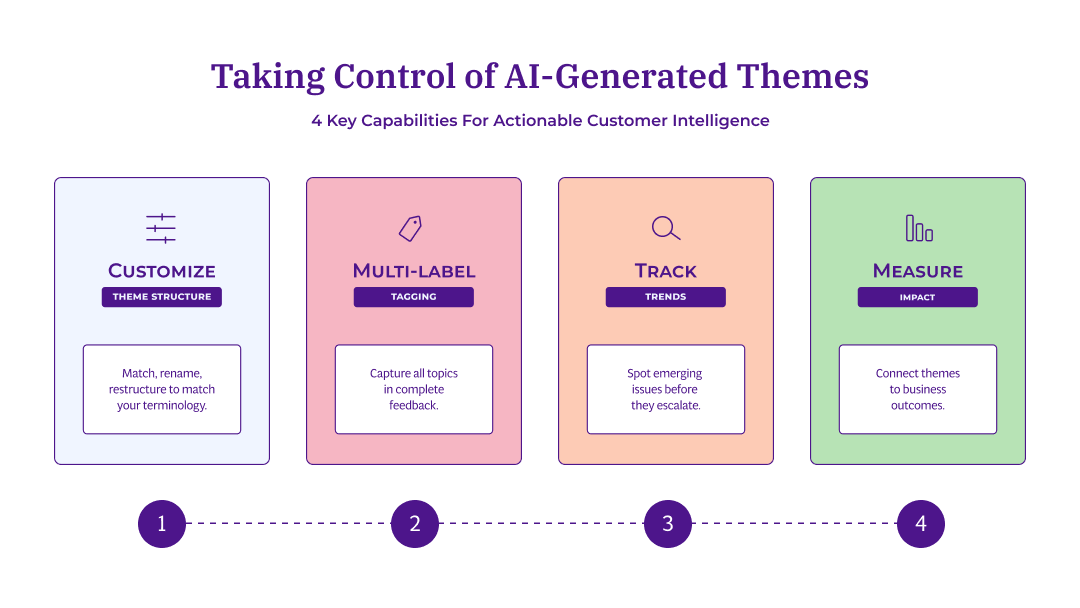
Taking control of AI-generated themes involves four key capabilities: customizing structure, multi-label tagging, tracking trends, and measuring impact.
Can I customize AI-generated themes?
With the right platform, yes. You can merge, rename, and restructure AI-generated themes to match your business terminology.
Not all solutions offer this flexibility.
Some trap you in black-box AI where you only see outputs, others require specialists to train custom models, and some force manual rule-building.
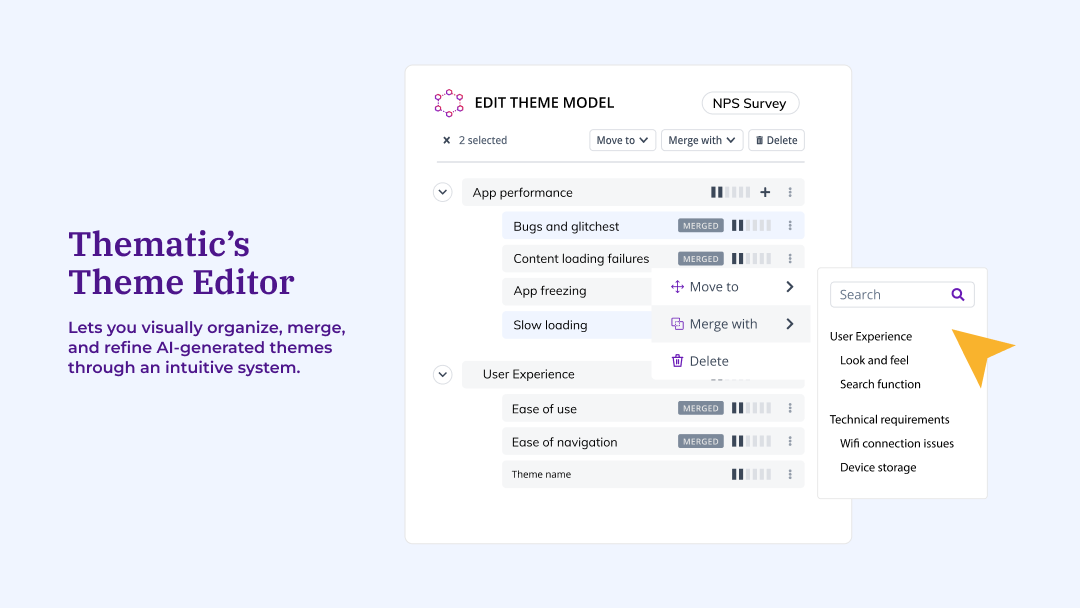
Thematic's Theme Editor takes a different approach. You're not locked into the AI's initial output. Rather, it works like a file and folder system.
Drag and drop to reorganize. Merge similar concepts. Delete themes that add noise.
The interface is visual and intuitive. No coding required.
Thematic's theme editor lets you visually organize, merge, and refine AI-generated themes through an intuitive drag-and-drop system.
Here’s what you can do:
Rename themes to match your company's language. If customers say "slow service" but your team calls it "response time," rename without losing underlying data.
Merge themes that represent the same concept. Combine "delivery issues" and "shipping problems" into one unified theme.
Create sub-themes to break broad categories into specifics. A general "pricing" theme becomes "price increases," "competitor pricing," and "value for money." This hierarchical structure helps teams navigate from high-level patterns to specific actionable issues.
Add new themes manually for concepts the AI missed. Run additional discoveries to find new patterns.
Your changes train the AI. When you merge or rename themes, the system learns and applies your decisions to future analysis.
Your edits teach the AI your business preferences and terminology, so future feedback gets categorized using your validated framework. You get automation speed with human precision.
How Thematic's theme customization compares to other approaches
AI feedback tools handle theme customization differently, and the right fit depends on your team's needs.
Some platforms prioritize simplicity with pre-built AI models. You get fast results, though theme structures are fixed.
Others offer custom model training for organizations that need highly tailored outputs. This works well for teams with data science resources and longer implementation timelines.
Rule-based tools give you precise control through keyword matching. They're effective for predictable feedback patterns, though they require ongoing maintenance as customer language evolves.
Thematic's Theme Editor is designed for teams that want flexibility without technical overhead. The drag-and-drop interface lets you restructure themes yourself, and your edits train the AI. When you merge "delivery issues" and "shipping problems," the system applies that decision to future feedback automatically. You're not starting from scratch each time or waiting for a vendor to retrain a model.
When to customize vs. trust the AI output
Knowing when to intervene saves time and improves results. The AI typically achieves 80% or higher accuracy out of the box.
Here are specific signals to watch for.
Signs you should customize:
Your industry uses terminology the AI does not recognize (e.g., "chargeback" in fintech, "formulary" in healthcare)
Themes are too broad to act on (e.g., "product issues" instead of "battery drain" vs. "screen responsiveness")
Multiple themes describe the same underlying issue from different angles
You need themes that map directly to specific teams or business objectives
Signs you can trust the output:
Themes are already specific and actionable (e.g., "app crashes on checkout")
You’re analyzing a new dataset for exploratory purposes
The AI's language already matches how your organization talks about issues
Low-volume themes that rarely appear and don’t drive decisions
Once you’ve decided to customize, sort themes by frequency first, then review the most common ones. This follows theme editing best practices and ensures your effort has maximum impact.
Mitre 10, a hardware retailer processing 20,000 customer comments per month across 84 stores, used this approach.
They connected VoC insights directly to their OKRs and discovered which themes had the biggest impact on NPS. As a result, they were able to make data-driven decisions instead of gut-feel prioritization.
How does AI handle feedback that mentions multiple topics?
In Thematic, AI tags the response to multiple themes simultaneously.
This is called multi-label assignment, and not all platforms support it.
A review mentioning both "pricing" and "customer service" gets tagged to both themes, not forced into one.
Take note that real customer feedback is rarely about just one thing. A single response might praise product quality, complain about shipping, and ask about a feature. Forcing that into one category loses two-thirds of the insight.
Why single-label systems fail with real feedback
Single-label systems force each piece of feedback into one category. This creates a distorted picture.
An issue that appears alongside other topics gets underreported. It loses to the "primary" theme every time, even when it matters just as much.
Over time, this blind spot grows. You miss patterns that only become visible when you track co-occurring themes.
Multi-label assignment solves this.
Each comment can be tagged by more than one theme, but never the same theme twice. This is how Thematic's theme creation ensures complex feedback is fully captured.
At scale, this accuracy compounds. When analyzing thousands of responses, even small miscategorization rates add up fast.
Consider this example feedback:
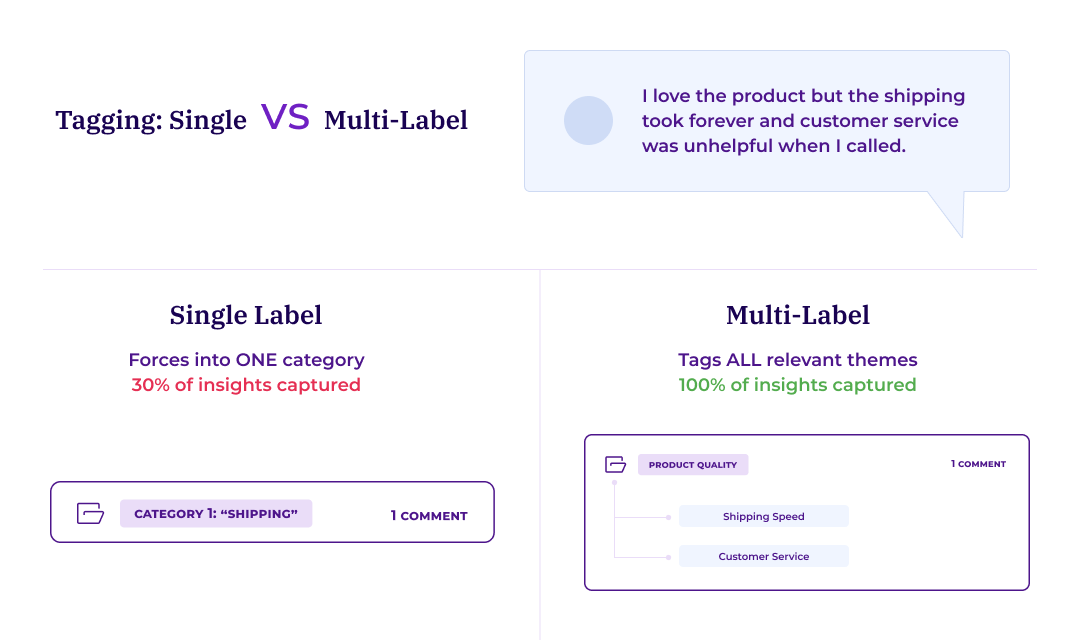
"I love the product but the shipping took forever and customer service was unhelpful when I called."
A single-label system forces this into ONE category. If tagged as "Shipping," you completely lose the product quality praise and the customer service complaint.
A multi-label system tags to ALL relevant themes:
Product quality (positive sentiment),
Shipping speed (negative sentiment),
Customer service (negative sentiment).
You get the complete picture and can route insights to the right teams.
Multi-label tagging captures all relevant themes from a single piece of feedback, ensuring no insights are lost in the grouping process.
Can I track how customer feedback themes change over time?
Yes. AI theming tools like Thematic track how themes emerge, grow, or decline over time. This helps you spot emerging issues before they become widespread. It also lets you measure the impact of changes you’ve made.
Static snapshots tell you what people said last month. Trend analysis tells you what's getting worse, what's getting better, and what new issues are surfacing.
This transforms your feedback program from reactive to proactive. You stop responding to crises and start preventing them.
What trend tracking shows you
Trend tracking reveals theme movement by volume, sentiment, or impact on CX metrics. You see whether an issue is a one-time spike or a sustained trend that demands attention.
How trend tracking works
Automated trend tracking follows a consistent process:
The system analyzes incoming feedback against your existing theme structure
It calculates changes in frequency, sentiment, and business impact for each theme
Statistical tests flag movement that exceeds normal variation
New emerging themes surface automatically when patterns appear in the data
In Thematic, emerging issue detection catches problems at 0.5% mention rate before they become crises.
Without automated detection, most teams don’t notice problems until they hit 5% or 10% mention rate. By then, damage is done.
New themes emerge automatically as fresh feedback arrives. You don’t miss unexpected issues that traditional surveys might never think to ask about.
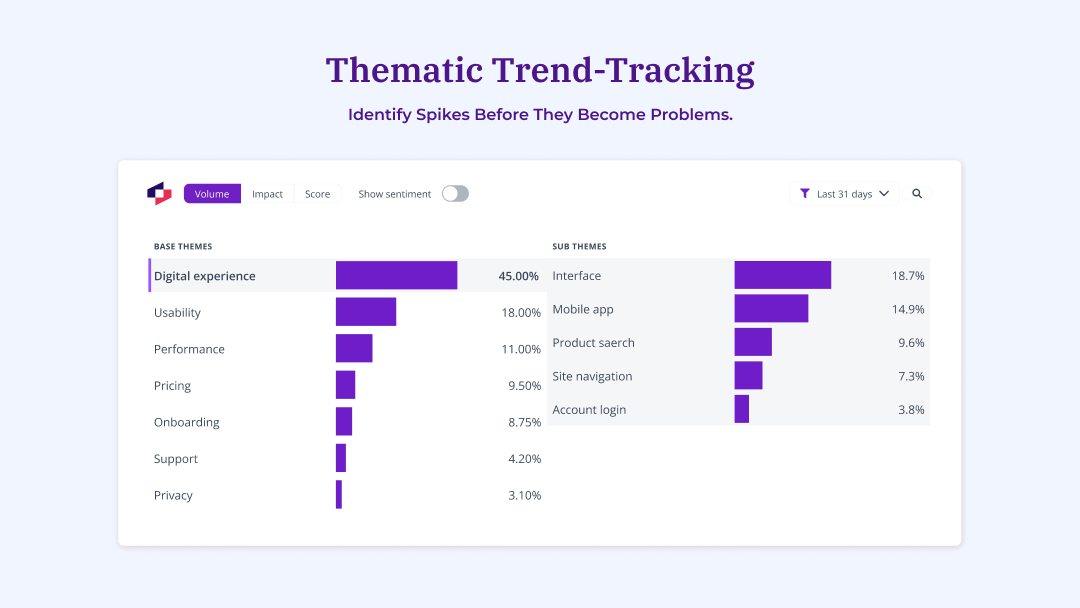
Trend tracking helps you identify which themes appear most frequently, so you can spot emerging issues before they escalate.
This early detection capability proved critical for Greyhound.
They used this approach to spot accelerating issues in real time.
They went from waiting 3 to 4 weeks for reports to identifying problems within 10 minutes. That 99.7% reduction in analysis time let them fix issues before revenue impact.
As Matthew Schoolfield, Senior Customer Insights Analyst at Greyhound, explained:
"The over-time feature is always interesting to me, being able to view different themes over time and how they've improved or declined."
The difference between knowing something two weeks late and knowing it today can be millions in prevented churn.
How to use trend data for proactive decisions
You use trend data by comparing 30, 60, and 90-day windows to spot patterns. These timeframes can be adjusted based on your feedback volume and business cycles.
Then classify themes:
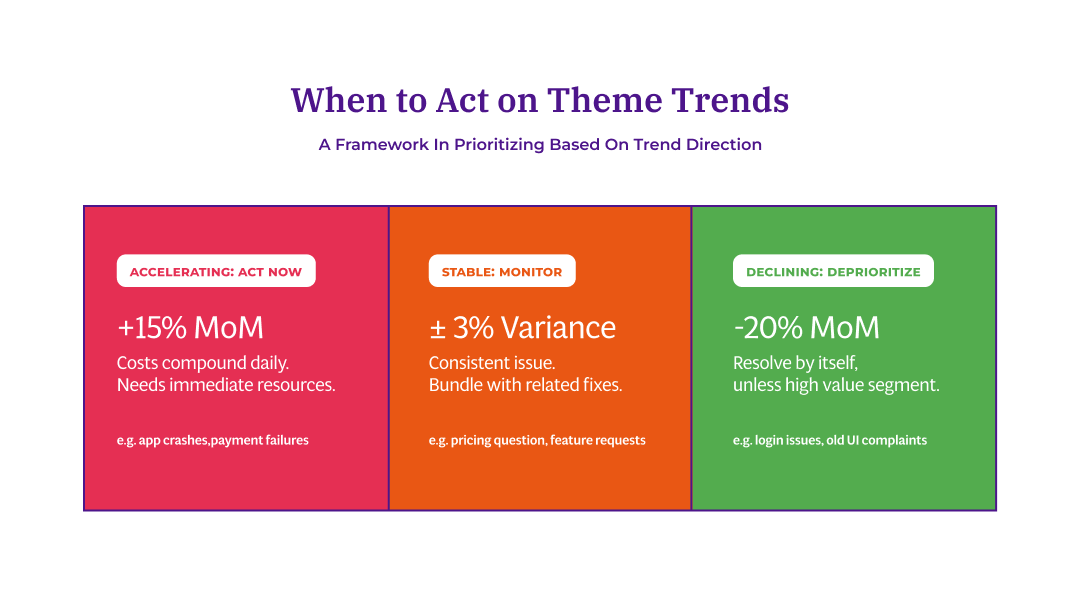
Accelerating: Act now. Costs compound daily. These issues are getting worse and need immediate resources.
Stable: Monitor or bundle with related fixes. These are consistent problems you can address systematically.
Declining: Deprioritize unless segment value is high. These problems are resolving on their own.
Prioritize themes based on trend direction: act immediately on accelerating issues, monitor stable ones, and deprioritize those already declining.
An accelerating issue with moderate impact deserves more attention than a declining issue with high impact. You’re preventing future damage versus cleaning up past problems.
The cost of early intervention is almost always lower than the cost of crisis response.
How do I find the root cause of customer complaints?
You find root causes by connecting themes to metrics like NPS, sentiment, and satisfaction scores.
Here's what this means in practice: instead of just counting how often a theme appears, you measure how much that theme affects your scores when customers mention it.
This reveals a critical gap. Most teams prioritize by volume - what customers mention most. But customers leave based on impact - what actually changes their scores. A theme mentioned by 5% of customers might cost you more NPS points than one mentioned by 25%.
When you confuse volume for impact, you chase problems that barely move the needle.
The difference between identifying themes and understanding drivers
Identifying themes means discovering what customers talk about. Volume tells you the topics on their minds.
Understanding drivers means knowing which themes actually change customer behavior and scores. Impact tells you what makes them stay or leave.
Thematic's Impact Analysis calculates this: Impact = Overall average NPS minus Theme-specific average NPS.
A theme mentioned by 5% of customers might cost you more NPS points than a theme mentioned by 25%. Mention rate becomes irrelevant when you can see actual point drag.
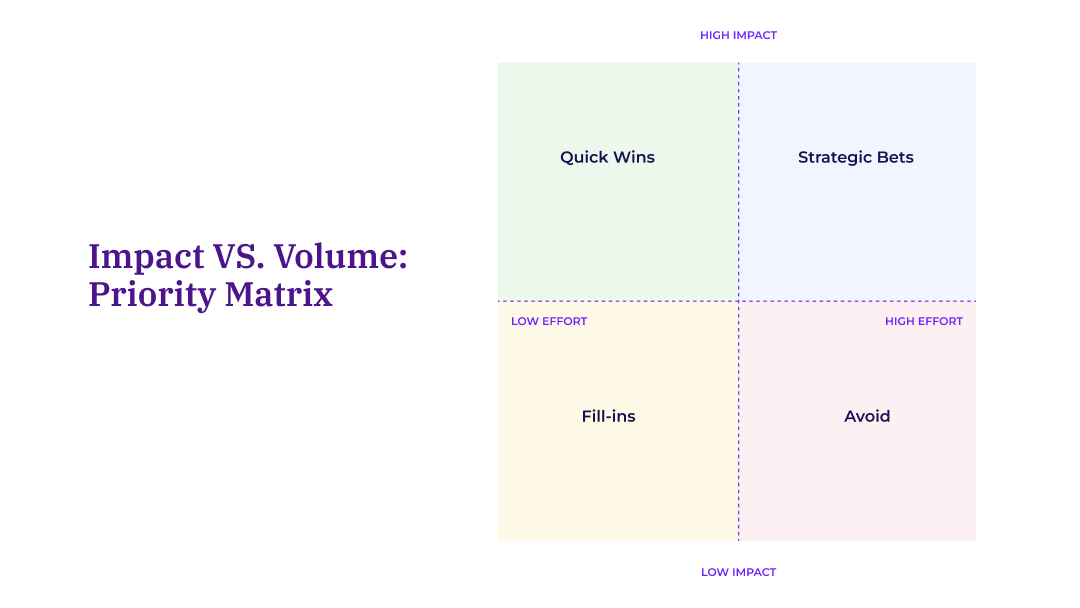
An impact vs. volume matrix helps you prioritize which themes to act on first based on their potential value and required effort.
Practical example: Identifying why NPS is dropping
The practical approach is to start with impact analysis, then segment by customer type, then check trend direction.
Complaint volume surged. Service issues dominated every dashboard. Leadership mobilized resources for what looked like an obvious crisis.
When they ran NPS root cause analysis, the findings surprised them.
Baggage handling wasn’t mentioned most frequently. But it had the biggest negative impact on NPS. And 80% of those issues were fixable with existing resources.
Orion Air refocused. They fixed baggage handling first.
Result: 1.6-point NPS increase in that segment, contributing to 13% overall improvement.
Measurable revenue gains followed. The fix paid for itself in months.
Volume lies. Impact tells the truth.
This approach follows the IST framework: Impact first, then Segment, then Trend. It ensures you fix what matters to the customers who matter most.
Taking control of your AI-generated themes
AI theming tools work best when you customize them to your business context.
Theme customization, multi-label assignment, trend tracking, and impact analysis give you both speed and precision.
You’re not choosing between automation and control. You get both.
The teams that get the most value from AI theming treat it as a partnership. Let the AI do the heavy lifting of initial discovery. Then refine, customize, and connect themes to outcomes that matter.
Or do you prefer to see how this works with your own data? Book a demo and we’ll show you which themes are actually moving your metrics.
Frequently asked questions
Will customizing themes affect historical data?
Yes. When you merge, rename, or restructure themes in the Theme Editor, the system automatically re-analyzes all your existing feedback against the new structure.
This means your historical trends remain consistent and comparable. A comment tagged to "Delivery problems" last month will now appear under your new "Shipping issues" theme if you merged them.
Reprocessing typically completes quickly for most datasets. You receive an email when the new themes are visible in your dashboards.
How often should I review and update my theme structure?
Review quarterly or when your business changes significantly.
Product launches, pricing changes, and new competitors can generate new themes worth tracking.
Focus on high-volume themes first since they have the greatest impact on your analysis quality.
Can I create custom theme hierarchies?
Yes. Thematic organizes themes into base themes and sub-themes. For example, "Customer Service" might contain "Phone Support," "Live Chat," and "Response Time." Learn more about base and sub-themes.
You can restructure this hierarchy to match how your organization thinks about customer issues.
What if the AI misses a theme that matters to my business?
Add it manually and run additional theme discoveries. Create a new theme with a few mapped phrases, then let the AI suggest similar phrases. This combines your business knowledge with the AI's pattern recognition.
The system learns from your additions and applies them going forward.
Share
Link Copied!
Request a demo of Thematic's Customer Intelligence Platform
Thematic turns fragmented feedback into one consistent source of customer truth — so every team acts on the same customer story. Up and running in days, not quarters.
Thank you! Your submission has been received!
Oops! Something went wrong while submitting the form.