Review Analysis: How to Analyze Customer & Product Reviews
What review analysis is and how businesses use it to make better, data-driven decisions + a comparison of the best review analysis tools for making it happen.
Review analysis is the process of systematically examining customer feedback from multiple sources to identify patterns, sentiment, and themes that guide business decisions.
AI-powered review analysis tools like Thematic can automatically discover themes across Google, Trustpilot, app stores, and other channels - no manual coding or pre-labeling required.
The best tools turn thousands of scattered comments into structured, actionable insights without manual coding or pre-labeling.
The right tool depends on your stack, data volume, and how much control you need over the analysis process.
86% of consumers are reluctant to buy from companies with too many negative reviews. Responding to customer concerns has never been more critical.
Product reviews contain insights that can guide development, troubleshoot initiatives, and improve customer experience.
They reveal how you measure up against competitors by identifying market opportunities and areas for improvement.
But there's a challenge. Qualitative feedback is messy by nature.
You can't extract meaningful patterns with a simple search. Making sense of thousands of unstructured reviews feels overwhelming.
Many operations teams only look at star ratings. Some read through samples of positive and negative comments. But to extract real value from customer reviews, you need a way to rapidly analyze large quantities of unstructured data.
The best approach? AI-powered analytics tools that deliver insights in minutes, not weeks.
In this guide, we'll cover what review analysis is and how businesses use it to make better decisions. We'll walk through the four main steps to get started, and show you how to choose the right tool for your needs.
What is review analysis?
Review analysis transforms unstructured review data into structured insights that guide decision-making.
Review analysis (also known as customer review analysis) is the process of systematically examining customer feedback from multiple sources to identify patterns, sentiment, and actionable themes.
Modern feedback & review analytics platforms automate this process through AI-powered theme discovery, identifying patterns across Google, Trustpilot, app stores, and other sources without pre-labeling or manual coding.
Here's how businesses use review analysis:
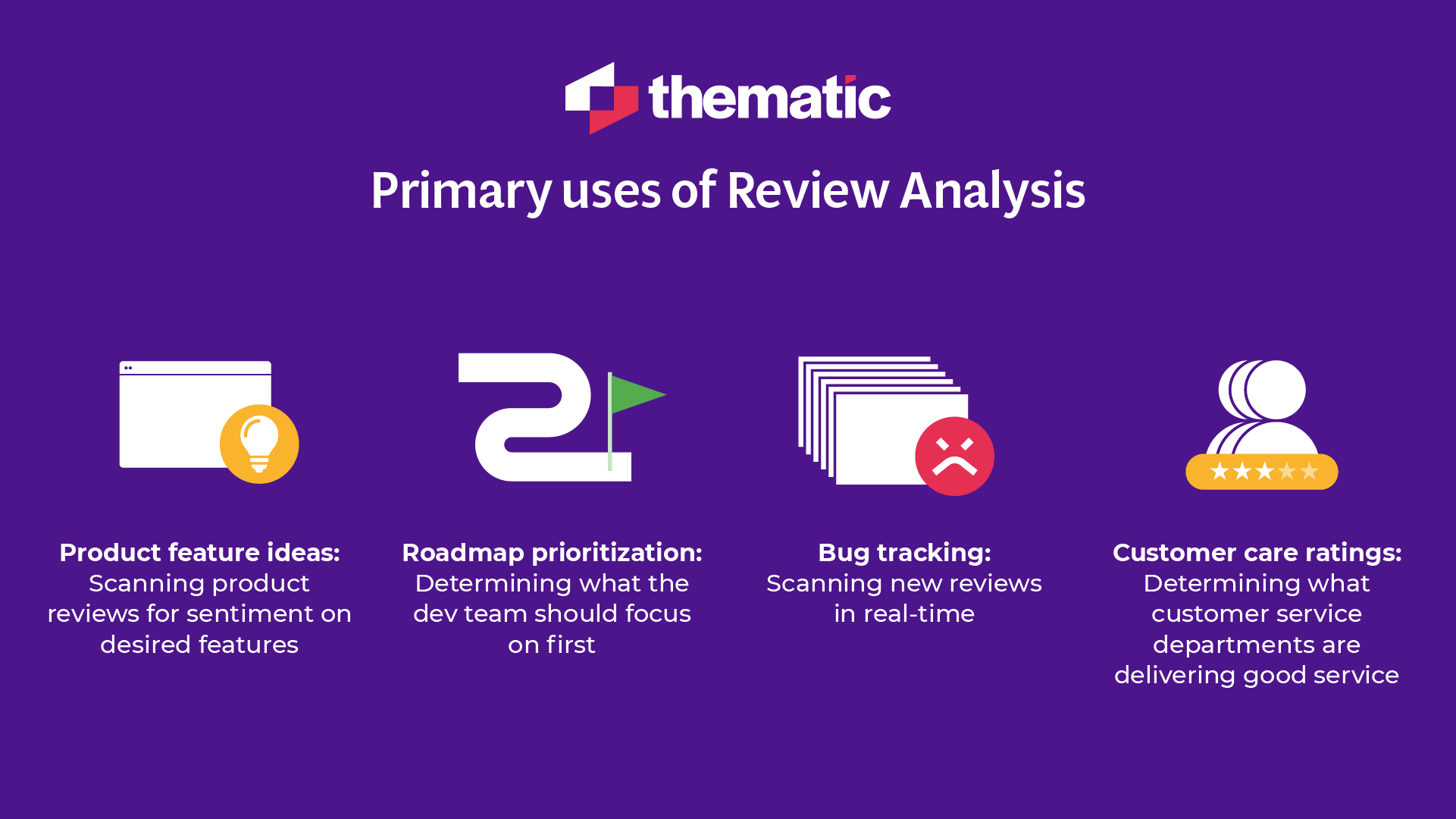
Product feature ideas: Scan product reviews for sentiment on desired features
Bug tracking: Monitor new reviews in real-time to identify urgent issues
Customer care ratings: Assess which customer service departments deliver good service
For instance, a tablet manufacturer analyzing Amazon reviews might discover they need better packaging. Or their review data might show customers now expect startup times under 30 seconds.
App store review analysis tells developers whether they need better GPS connectivity or shows that their map design is appreciated (meaning changes should roll out slowly).
Positive reviews of specific team members also help identify and recognize top-performing employees.
Why is review analysis important?
Review analysis helps you understand what customers really think of your app, site, or experience. It enables you to become more customer-centric.
Without review analysis, companies often base development decisions on what's easiest to tackle or the CEO's personal preferences instead of what customers actually need.
Here's how businesses apply review analysis in practice:
Improve the customer experience
Reviews reveal insights about the customer journey and how to enhance it.
Atom Bank used Thematic to analyze data from seven feedback channels and three product lines. Their goal was identifying which parts of the customer experience needed improvement.
Using Thematic's transparent analysis, they identified the main issues customers faced and took action to address them.
The result? A 40% reduction in call center volume and 110% growth in their customer base.
Create better products
Review analysis uncovers what customers do and don't like about your products, revealing hidden issues you didn't know existed. This data is invaluable for targeted product validation and improvements.
Melodics then created specific projects to address this issue, directly responding to customer feedback.
Track brand reputation
Monitoring what customers say in online reviews provides insights into your brand reputation.
Organizations can track reviews over time to see how customer opinion is changing. If there's a significant drop in customer sentiment, they can dig deeper into the data to uncover and address specific issues causing negative feelings. Taking action on these insights is the path back to building positive brand reputation.
Address urgent issues
If you're using an AI-powered analytics tool like Thematic, you can set up alerts to notify you when urgent issues appear in your review data.
For example, you might set an alert for topics like "data breach" or "privacy." If there's a spike in reviews mentioning these topics, you're automatically notified. Your team can then take immediate action.
Create better marketing campaigns
Reviews help you learn more about your customers so you can personalize marketing campaigns.
Digging deep into review data uncovers new pain points or features current customers love. This is all valuable material for creating content that resonates with your target market.
Monitor the competition
Review analysis doesn't have to be limited to your own reviews.
Analyzing competitors' reviews gives you a better picture of their strengths and weaknesses. It also helps you identify potential opportunities and gaps in the market. For example, you might notice many of their customers complain about a missing feature. Addressing this gap could strengthen your market position.
Data sources for review analysis
Review data comes from multiple sources, each with different characteristics and audiences.
Before getting started, you'll need to decide which sources best match your goals. Keep in mind that there can be significant differences between channels and sites.
For example, Facebook attracts more informal reviews while G2 reviewers typically write more detailed technical comments. Reviewers may also be more candid when writing on third-party sites compared to your company's app or website.
Certain demographics prefer specific channels. Social media reviewers tend to be younger and more tech-savvy, while Yelp is much more popular in North America than in Europe.
We recommend pulling reviews from several channels to get diverse viewpoints.
Here's where you might source your review data:
Online review sites: Tripadvisor, G2, Yelp, Trustpilot, Google, App Stores, and even Glassdoor for employee reviews
Social media: Facebook, Instagram, YouTube, or TikTok (includes Facebook reviews, comments on posts, or direct messages)
Product reviews: E-commerce businesses can collect reviews on their own website or on vendor websites like Amazon
Email, phone calls, or in-app reviews: Customers might leave reviews by responding to email surveys or within your app
Review sites, social media, product reviews, and support conversations provide data for analysis.
How do you analyze reviews?
Review analysis used to be slow and time-consuming. Now AI-powered tools make it easy to analyze thousands of reviews in minutes.
Here are the 4 steps to successfully analyze your reviews and get actionable insights that make a real impact.
Step 1: Select an AI review analysis tool
Before you begin, plan which tools you'll use to analyze your reviews.
Advanced AI analytics tools like Thematic analyze huge quantities of reviews and condense that data into accurate insights.
Start by thinking about what you want to achieve from analyzing your reviews and how you'll share and use results. You can then select the solution that best matches your goals, budget, and technical requirements.
For example, larger organizations with significant quantities of complex unstructured data need more advanced AI solutions. You'll find more tips on choosing the right tool in the next section.
Thematic - Review Analysis
AI-powered feedback analytics software to transform review data into powerful insights that drive decision making.
Next, select the data you want to analyze and collate it in one place.
The easiest approach is using an AI analytics tool like Thematic. Most advanced analytics tools have ready-made integrations with major online review sites and social media platforms. If you're planning to use reviews from your website or app, check how easy it is to upload them to the analytics tool.
This step also includes preparing your data for AI analysis. Analysis tools usually do this automatically by preprocessing and cleaning the data (removing links, slang, and other unnecessary elements).
Step 3: Analyze your review data
You're now ready to analyze your data.
Most advanced analytics solutions like Thematic use large language models (LLMs) combined with traditional AI techniques. The system automatically tests and adjusts its approach to ensure the best method is used for each task.
The goal of these thematic analysis tools is to automate theme or topic discovery in text. They scan through all your review data and identify recurring topics even when different wording is used.
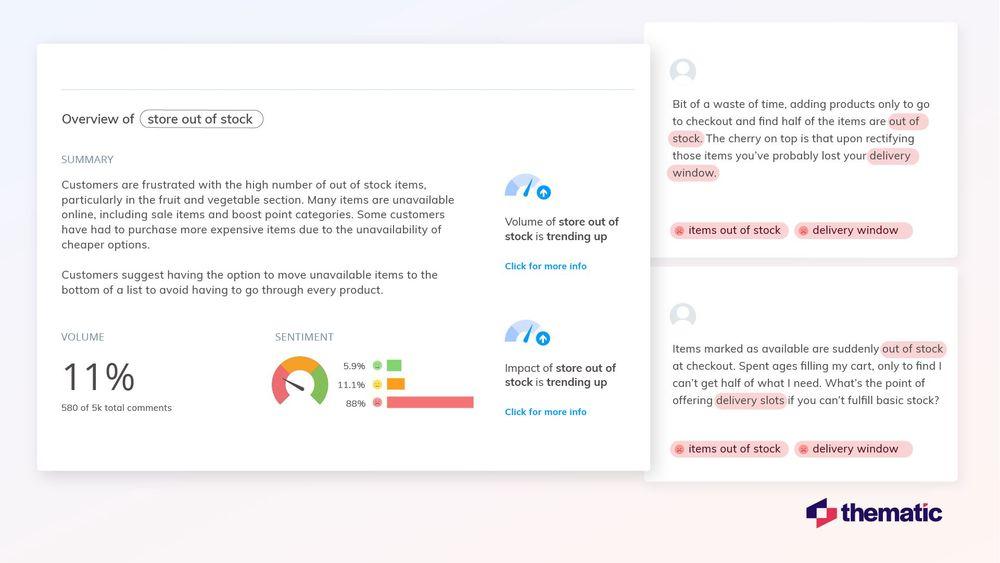
In the example below, you can see results for the theme "store out of stock." This theme appeared in 11% of reviews analyzed, indicating it's an important issue to address.
The insights show that 88% of mentions of this theme are negative. Clearly these customers are unhappy.
You can also see a summary of the theme providing more details about customer feelings. They're frustrated with out-of-stock items, and some customers had to buy more expensive items because cheaper ones were unavailable.
This gives you a clear picture of what your teams need to work on to improve customer satisfaction.
💡
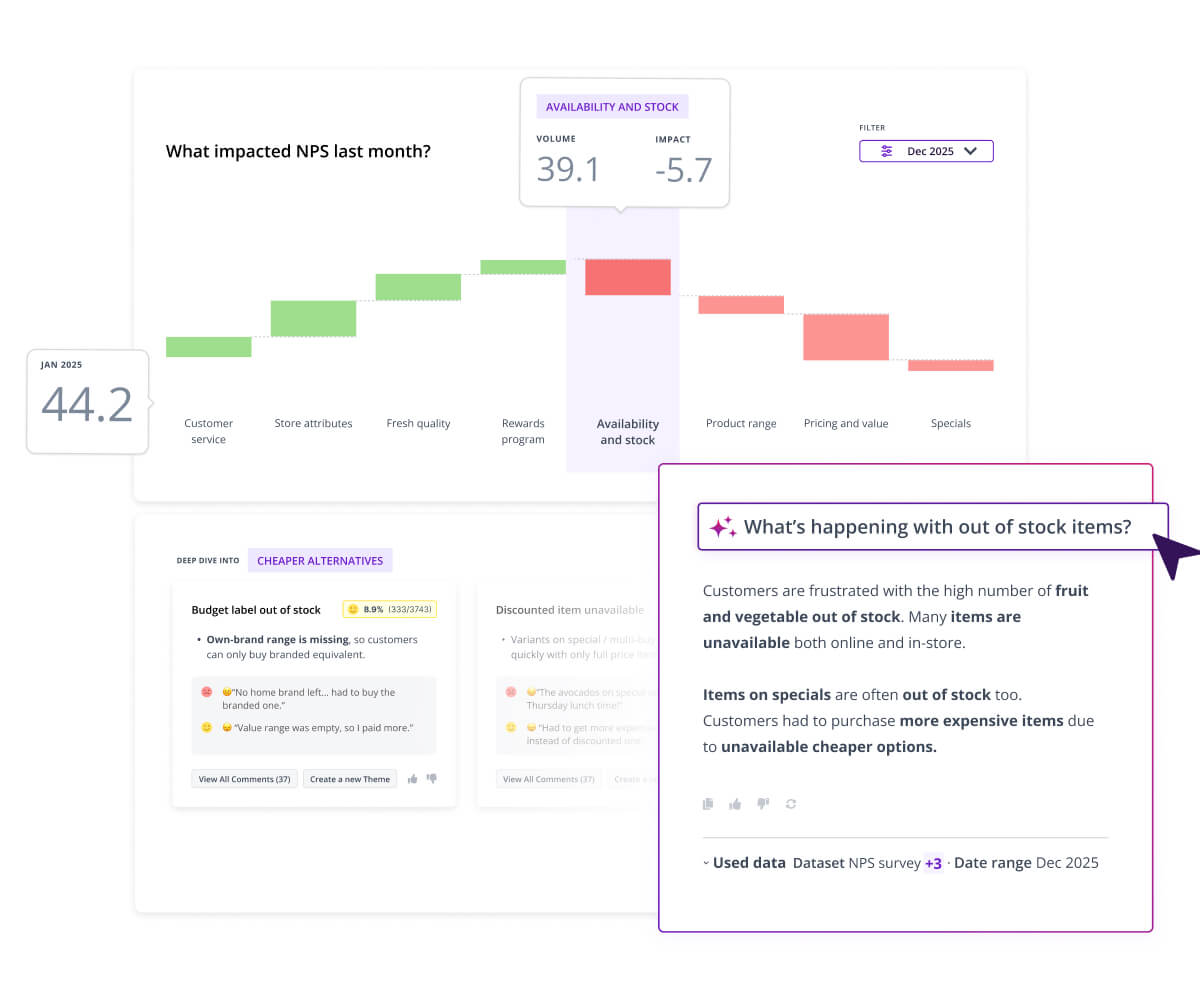
Thematic Expert Tip: Anyone can ask questions about your data using Generative AI
Thematic has a handy tool called Thematic Answers which makes it easy to dig deeper into your review data. This is great for non-technical teams who need direct access to insights. Users simply type questions about customers' opinions on specific themes and topics, and Thematic's Generative AI provides the answers.
Step 4: Share your insights and take action
Insights are only valuable if you use them.
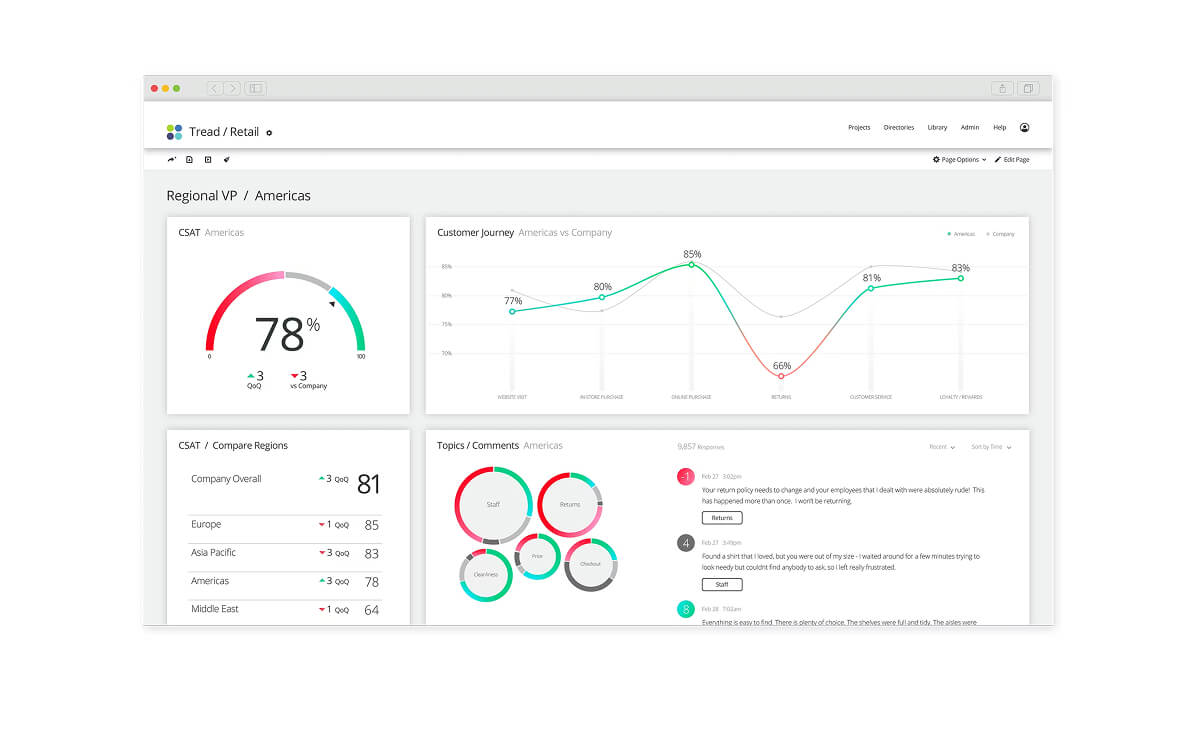
Most advanced AI analytics tools make it easy to share insights and visualizations across your organization. We recommend ensuring feedback is accessible to all departments, from product development to customer service. You can better empower each team to act on relevant insights and get buy-in from stakeholders by sharing the data behind your recommendations.
Don't forget to follow up with customers after acting on their reviews. For example, you could reach out to customers who had urgent or high-impact issues to let them know what you've done to fix them.
This helps improve customer retention and boost brand loyalty by showing you listen to what they say.
Our final recommendation is to use your insights to keep improving your products, services, and customer interactions. Aim to create a feedback loop that enhances customer experience over time.
As you take action on your analytics findings, you should see a positive impact in your review data and more happy customers.
How to choose review analytics tools
Choose review analytics tools based on four key factors: autonomous theme identification, integration capabilities, scalability, and budget.
When evaluating tools, think about what you want to achieve and what type of data you have. Here are specific recommendations:
Look for autonomous theme identification: The first feature you should evaluate is analytics capabilities. Select a tool that can automatically and accurately identify all themes in your data.
Check integration capabilities: Make sure you can easily connect your data with the platform. Most advanced analytics tools have built-in integrations to major review sites and social media platforms.
Consider scalability and support: Choose a tool that can scale with your business as it grows. A robust support system is essential for troubleshooting and maximizing capabilities over time. Look at how proactive the company is when rolling out upgrades and new features. Analytics tools that stay current with the latest AI developments will help you stay ahead.
Consider your budget: Balance cost with features. Sometimes spending more upfront can save money by improving efficiency. If budget is an issue or you're just getting started, look for tools that offer pricing plans.
Enterprise Review Analysis Software
See How Thematic Unifies Review Data on Top of Your Existing Tools
AI-powered review analysis for enterprise CX and insights teams
How it works: Thematic uses unsupervised AI to discover themes directly from your review data. You don’t pre-define categories or label training data. The AI surfaces what customers are actually saying, then you refine and validate the results using the Theme Model Editor. The full theme model is typically ready in about 3 days.
Key strengths:
Unifies reviews from Google, Trustpilot, app stores, social, surveys, and support tickets into one transparent analysis
The Theme Model Editor gives each team (e.g., product, CX, operations) the ability to build a model specific to their needs, all from the same source of customer data
Every theme traces back to source reviews, making insights auditable and defensible for executive reporting
Best for: Enterprise CX and insights teams that need research-grade customer intelligence across multiple review platforms, and whose stakeholders require transparent, verifiable analysis.
Limitations: Better suited for medium-to-large data volumes. Teams with fewer than a few hundred reviews per month may not see the full benefit of unsupervised discovery.
Review sources: Google, Trustpilot, Apple App Store, Google Play, social platforms, surveys, support tickets, and more via integrations and API.
Setup time: ~3 days for a full theme model, with no pre-labeling required.
Rough price band: Enterprise pricing. Contact Thematic for a quote based on data volume and team size.
2. Qualtrics XM Discover: supervised ML for teams in the Qualtrics ecosystem
How it works: XM Discover (formerly Clarabridge) uses supervised machine learning. Human analysts manually tag thousands of comments to train classification models, which then learn to identify similar patterns. New themes that emerge outside the trained categories require retraining, which typically involves additional professional services work.
Key strengths:
Deep integration with the broader Qualtrics XM platform
Strong for teams that have already standardized on Qualtrics for survey collection and CX measurement
Supervised ML handles linguistic variation better than keyword-based rules, recognizing that different phrasings can describe the same issue
Best for: Organizations already running their CX program on Qualtrics who want review analysis that feeds directly into existing dashboards and workflows.
Limitations: Requires labeled training data upfront. Discovering new or emerging themes outside the trained model means going back through PS, which adds time and cost. Setup typically involves 2-4 weeks of professional services plus 2-4 weeks of internal work. Ongoing customization and new use cases run through the same PS bottleneck.
Review sources: Integrates with major review platforms; works best within the Qualtrics ecosystem.
Rough price band: Enterprise pricing. Contact Qualtrics for a quote.
Qualtrics XM Discover
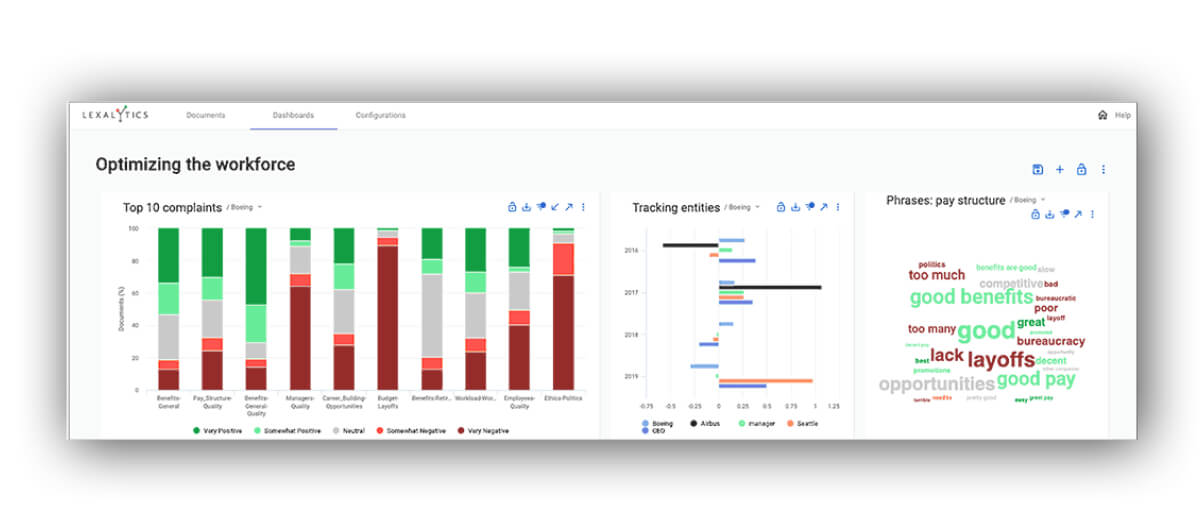
3. Lexalytics (InMoment): NLP-based review analysis with intention detection
How it works: Lexalytics combines Natural Language Processing (NLP) with machine learning to analyze review text. Now part of the InMoment CX platform, it’s designed for teams that need to monitor and analyze reviews across a range of sources.
The platform also includes customer intention detection capabilities for identifying signals like churn risk or brand advocacy within review text.
Key strengths:
NLP-based approach for nuanced text understanding
Customer intention detection adds a layer of predictive signal to review data
Part of the InMoment platform, which includes broader CX capabilities
Best for: Teams that need NLP-driven review monitoring and want to identify churn or advocacy signals within review text.
Limitations: As Lexalytics has been absorbed into the InMoment platform, buyers should evaluate the full InMoment suite to confirm which features and integrations are available in their pricing tier. Product documentation may lag behind the current offering as the platforms continue to merge.
Review sources: Broad source coverage across social media, review platforms, call center, and support channels.
Setup time: Contact InMoment for details
Rough price band: Enterprise pricing. Contact InMoment for a quote.
Lexalytics (now InMoment)
Review Analysis Tool comparison matrix
If you need…
Choose…
Because…
Unified review analysis across Google, Trustpilot, app stores, and surveys
Thematic
AI discovers themes automatically with transparent control via the Theme Model Editor
Review analysis integrated with the Qualtrics CX suite
Qualtrics XM Discover
Deep ecosystem integration, though setup requires PS involvement and labeled training data
NLP-based review monitoring with broad source coverage
Lexalytics (InMoment)
Combines NLP with ML and detects customer intention (buy, quit, recommend), now part of the InMoment CX suite
Research-grade analysis across reviews, surveys, and support tickets from a single source of truth
Thematic
Every theme traces back to source reviews; acts as a feedback intelligence layer on top of your existing tools
Why use Thematic for review analysis
Thematic reduces review analysis time from weeks to hours while uncovering insights you'd miss with manual analysis.
Here's what makes Thematic different:
Unifies review data across platforms
Thematic acts as a feedback intelligence layer, sitting on top of your existing review platforms. Instead of manually aggregating reviews from Google, Trustpilot, app stores, and other sources, Thematic automatically pulls data from multiple channels into one transparent analysis.
Transparent, research-grade control
Unlike black-box AI tools, Thematic gives research and insights teams complete transparency into how themes are built. The Theme Editor lets you edit, refine, and validate AI-generated themes, making your analysis auditable and defensible for executive reporting.
This human-in-the-loop approach combines AI automation with researcher control, delivering enterprise-grade analysis that's both fast and trustworthy.
Automatically discovers themes
Thematic's AI automatically identifies recurring themes in your review data, even when customers use different wording. You don't need to pre-configure categories or train the system. Themes are discovered from day one.
Delivers insights you can act on immediately
Thematic doesn't just categorize feedback. It shows you which themes drive your metrics, helping you prioritize what actually matters. You get clear, defensible insights that research and insights teams can confidently present to executives.
Making review analysis work for you
Your unorganized database of review data isn't a collection of chaotic data points. With appropriate analytics and an advanced AI analysis tool like Thematic, this dataset can become a goldmine of insights.
In this guide, we've covered the basics of review analysis and how you can apply it to your own data to get high-quality, actionable insights. But the work doesn't stop there.
Take prompt action on your customers' feedback and let them know you've acted on their input. Once that's done, keep monitoring new reviews to pick up on emerging issues that might need attention. That's how you create a feedback loop that enhances customer experience over time and shows your customers you're really listening.
Want to see a review analysis software demo?
See how Thematic analyze large volumes of review data, from multiple sources, and produces intelligent insights. You can book a free guided demo of Thematic here.
Frequently asked questions (FAQs)
The best review analysis software for multi-platform analysis depends on your team's needs. Thematic is a strong option for enterprise CX and insights teams: it automatically categorizes feedback from Google, Trustpilot, app stores, and other sources into themes, with no manual coding required. Unlike black-box AI tools, Thematic gives research teams transparent control to edit and validate how themes are built via the Theme Model Editor, making analysis auditable for executive reporting.
Use a review analytics tool that integrates with both platforms natively and unifies them in a single analysis environment. Thematic connects to Google, Apple App Store, Google Play, and Trustpilot, among other sources. Once connected, the AI discovers themes across all sources simultaneously, so you can see whether a complaint about app performance is isolated to one platform or appearing across all of them.
With AI-powered tools like Thematic, analyzing thousands of reviews takes hours rather than weeks. Setting up a full theme model takes about 3 days with no pre-labeling required. Manual analysis of the same volume could take 2-3 weeks. And unlike manual analysis, AI-powered review analysis automatically detects new themes as fresh reviews arrive, delivering decision-ready insights on an ongoing basis.
Manual review coding involves a researcher reading each comment and assigning it to a category. It's accurate but slow, and it only covers what the researcher thinks to look for. Automated review analysis uses AI to scan all reviews simultaneously, identifying recurring themes even when customers use different words. The best tools combine both: AI discovers themes automatically, and researchers validate and refine them. For a deeper look at the tradeoffs, see our guide to coding qualitative data.
Use review analysis software that shows exactly how themes are built and connects insights to source data. Thematic provides research-grade, transparent analysis where every theme can be traced back to the specific reviews that informed it. The Theme Model Editor lets your team validate and refine AI-generated themes before they go into any report. According to a Forrester Total Economic Impact study, Thematic delivers 543% ROI over 3 years with payback in under 6 months, in large part because it makes the analysis process defensible, not just fast.
Connect your app store to a review analytics tool, let the AI surface the themes your users mention most, then filter by sentiment and volume to identify which issues are both common and driving negative ratings. Melodics used this approach with Thematic and discovered that app lag was a key driver of NPS decline. They created targeted projects to fix it: decisions grounded in what users actually said, not what the team assumed.
Use AI-powered review analysis software like Thematic to automatically identify themes across thousands of reviews. Thematic unifies review data from multiple platforms into one transparent analysis, reducing analysis time from weeks to hours while maintaining research-grade accuracy.
Yes. Advanced AI tools like Thematic use large language models combined with traditional AI to identify themes with high accuracy. The key is choosing tools that give you transparent control to validate and refine AI-generated themes, ensuring analysis quality.
Thematic acts as a feedback intelligence layer, sitting on top of existing review platforms. It automatically pulls data from Google, Trustpilot, app stores, social media, and other sources into unified analysis, eliminating the need to manually aggregate reviews.
Thematic combines AI automation with human-in-the-loop oversight. The Theme Editor lets you edit, merge, split, and validate how themes are built, giving you transparent control over the analysis while maintaining the speed benefits of automation.
Thematic connects to a wide range of review and feedback sources, including Google, Trustpilot, Apple App Store, Google Play, surveys, support tickets, and social media. It also integrates with many other sources via API and custom integrations, so teams aren't limited to out-of-the-box connectors.
Review analysis identifies specific issues customers face and what they value most. By acting on these insights, you can prioritize improvements that matter to customers, fix urgent problems quickly, and create a feedback loop that continuously enhances customer experience over time.
Share
Link Copied!
Request a demo of Thematic's Customer Intelligence Platform
Thematic turns fragmented feedback into one consistent source of customer truth — so every team acts on the same customer story. Up and running in days, not quarters.
Thank you! Your submission has been received!
Oops! Something went wrong while submitting the form.